3. GitLab CI/CD Pipeline Infrastructure
This document provides a comprehensive reference for the GitLab CI/CD pipeline infrastructure used by the global-workflow project. It covers the repository mirroring strategy between GitHub and GitLab, the pipeline architecture and configuration, the GitLab runner deployment on RDHPCS systems, and the day-to-day maintenance procedures that keep the system operational.
3.1. Overview
The global-workflow CI/CD system uses GitLab CI/CD as the execution engine for continuous integration testing across NOAA’s Research and Development High-Performance Computing Systems (RDHPCS). GitHub remains the authoritative repository where all development, code review, and pull request activity occurs.
The fundamental challenge this infrastructure solves is that NOAA’s HPC systems (Hera, Gaea, Orion, Hercules, Ursa) are not directly accessible from GitHub Actions runners. By mirroring the repository to GitLab and placing GitLab runners directly on those HPC systems, the project gains the ability to build and test the workflow in the same environments where it will be deployed operationally.
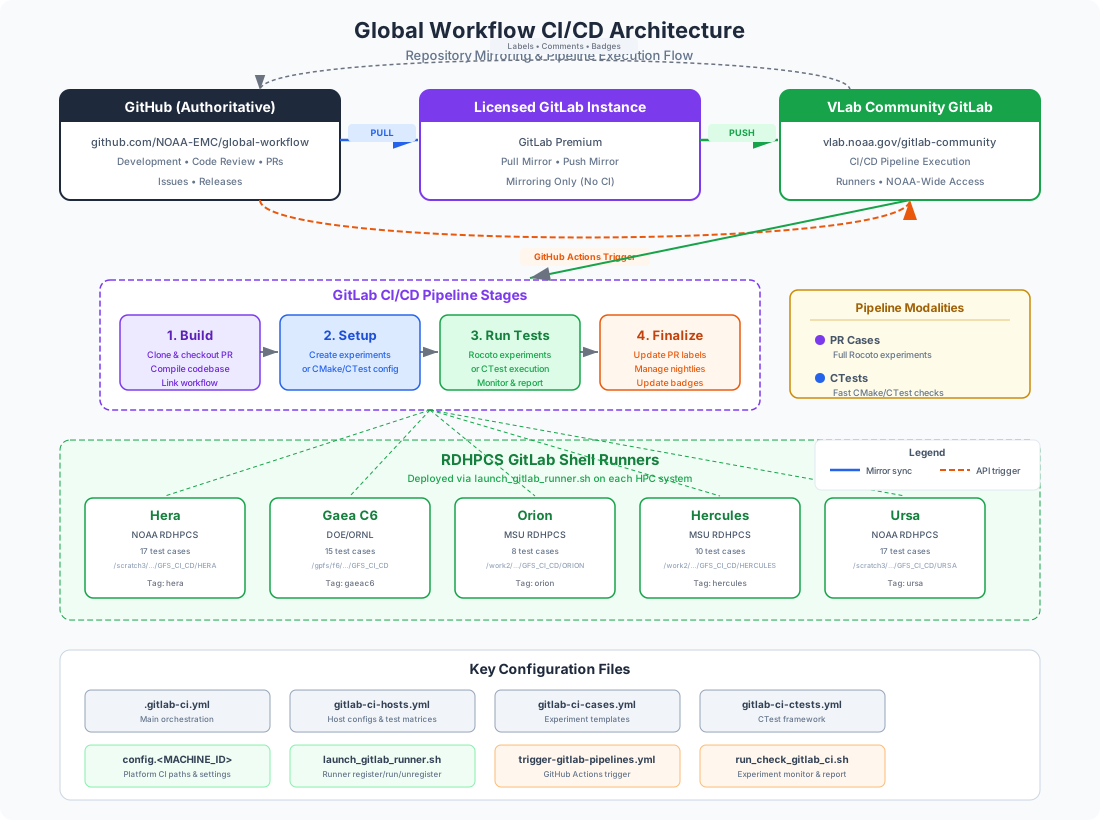
Fig. 3.1 High-level CI/CD architecture showing repository mirroring and pipeline flow.
The architecture can also be summarized textually:
┌──────────────────────────┐         ┌───────────────────────────┐         ┌──────────────────────────┐
│   GitHub (Authoritative) │  Pull   │  Licensed GitLab Instance │  Push   │  VLab Community GitLab   │
│   github.com/NOAA-EMC/   │ Mirror  │  (Premium — Mirroring     │ Mirror  │  vlab.noaa.gov/          │
│   global-workflow        ├────────►│   Only)                   ├────────►│  gitlab-community/...    │
│                          │         │                           │         │  (CI/CD Pipelines here)  │
└──────────┬───────────────┘         └───────────────────────────┘         └────────────┬─────────────┘
           │                                                                            │
           │  GitHub Actions                                               Pipeline Stages
           │  (API Trigger)                                                             │
           │                                                    ┌───────────────────────▼──────────┐
           │                                                    │  1. Build → 2. Setup → 3. Run →  │
           └───────────────────────────────────────────────────►│           4. Finalize            │
                                                                └──────────────────┬───────────────┘
                                                                                   │
                       ┌───────────────────────────────────────────────────────────▼───────────┐
                       │        RDHPCS GitLab Shell Runners                                    │
                       │  ┌───────┐ ┌────────┐ ┌──────┐ ┌─────────┐ ┌──────┐                   │
                       │  │ Hera  │ │Gaea C6 │ │Orion │ │Hercules │ │ Ursa │                   │
                       │  │17 case│ │15 cases│ │8 case│ │10 cases │ │17 cas│                   │
                       │  └───────┘ └────────┘ └──────┘ └─────────┘ └──────┘                   │
                       └───────────────────────────────────────────────────────────────────────┘
3.1.1. Key Design Principles
GitHub is authoritative: All development happens on GitHub (
https://github.com/NOAA-EMC/global-workflow). GitLab is used solely as a CI execution platform.Two-tier mirroring: A licensed GitLab instance performs the pull mirror from GitHub, and subsequently push mirrors to the NOAA community GitLab instance.
HPC-native testing: Runners execute directly on the target HPC nodes, ensuring tests build and run against the real Spack-Stack software environment.
Multi-modal pipelines: The system supports both comprehensive end-to-end experiment cases and fast CTest-based functional checks.
GitHub feedback loop: Pipeline results flow back to GitHub through PR labels, PR comments (including error log gists), and status badges.
3.2. Repository Mirroring: GitHub to GitLab
Because GitHub is the authoritative source of truth and GitLab is the CI execution platform, a reliable synchronization mechanism is required. The global-workflow project uses a two-stage mirroring strategy involving two GitLab instances.
3.2.1. Pull Mirroring (Licensed GitLab Instance)
The first stage uses pull mirroring, a feature that is only available on licensed (paid) tiers of GitLab (Premium or Ultimate). A single licensed GitLab instance is configured to pull from the authoritative GitHub repository:
Setting |
Value |
|---|---|
Source repository |
|
Direction |
Pull |
Scope |
All branches |
Sync frequency |
Automatic (every few minutes) |
The licensed instance’s sole purpose is mirroring — it does not run any CI/CD pipelines itself. Its pull mirror keeps the GitLab copy synchronized with GitHub, and its push mirror (described below) propagates changes onward.
Note
Pull mirroring is an advanced feature available only on licensed instances of GitLab (Premium tier and above). It is not available on GitLab Community Edition (CE) or the free tier. This is why a separate licensed instance is required for the first stage of the mirror chain.
3.2.2. Push Mirroring (Community GitLab at VLab)
The second stage uses push mirroring from the licensed GitLab instance to the NOAA community GitLab instance hosted at VLab:
Setting |
Value |
|---|---|
Target repository |
|
Direction |
Push |
Scope |
All branches |
Sync frequency |
Automatic (every few minutes) |
The VLab community GitLab instance is where the CI/CD pipelines actually execute. GitLab runners deployed on RDHPCS systems register against this instance, and all pipeline stages (build, setup, test, finalize) run here. This instance also provides the broader NOAA user community with read access to the repository.
3.2.3. Mirror Chain Summary
The complete mirror chain is:
GitHub (authoritative)
    │
    │  Pull Mirror (licensed GitLab feature)
    ▼
Licensed GitLab Instance (mirroring only)
    │
    │  Push Mirror (available on all GitLab tiers)
    ▼
VLab Community GitLab (CI/CD pipelines execute here, NOAA-wide access)
Both mirrored repositories track all branches, ensuring that any branch pushed to GitHub (including PR branches fetched during pipeline execution) is available for CI testing.
Important
Developers should never push directly to either GitLab instance. All code changes must flow through GitHub. The GitLab mirrors are read-only copies maintained by the mirroring configuration.
3.3. Pipeline Architecture
The pipeline is defined across four YAML configuration files that are included
from the top-level .gitlab-ci.yml:
File |
Purpose |
|---|---|
|
Main orchestration: stages, variables, base templates, build template |
|
Templates for standard experiment test cases (setup, run, finalize) |
|
Templates for CTest-based functional testing (CMake/CTest) |
|
Host-specific jobs, test matrices, runner tags, and conditional rules |
3.3.1. Pipeline Stages
Every pipeline execution proceeds through four stages in order:
build — Clone the repository, checkout the PR branch (if applicable), build the codebase via
ci_utils.sh build, and link the workflow.setup_tests — Prepare the test environment: create experiment directories (PR Cases) or configure the CMake/CTest build (CTests).
run_tests — Execute the tests: run Rocoto-orchestrated experiments (PR Cases) or run
ctestwith specific labels (CTests).finalize — Report results: update GitHub PR labels, manage nightly directory symlinks, and update status badges.
3.3.2. Pipeline Modalities
The PIPELINE_TYPE variable controls which testing modality runs:
3.3.2.1. PR Cases (PIPELINE_TYPE=pr_cases)
Comprehensive end-to-end experiment testing. Each test case is defined by a YAML
file in dev/ci/cases/pr/ that specifies an experiment configuration:
# Example: dev/ci/cases/pr/C48_ATM.yaml
experiment:
  net: gfs
  mode: forecast-only
  app: ATM
  resdetatmos: 48
  idate: 2021032312
  edate: 2021032312

workflow:
  engine: rocoto
  rocoto:
    maxtries: 2
The pipeline creates a full experiment directory, launches Rocoto, and monitors the workflow to completion. Failures are detected through Rocoto state tracking and reported back to the GitHub PR with error log gists.
Currently defined PR case tests include:
C48_ATM— Atmosphere-only forecastC48_S2SW— Coupled atmosphere-ocean-ice-waveC48_S2SWA_gefs— GEFS ensemble coupled runC48mx500_3DVarAOWCDA— 3DVar coupled data assimilationC48mx500_hybAOWCDA— Hybrid EnVar coupled data assimilationC96C48_hybatmDA— Hybrid atmosphere-only data assimilationC96C48_hybatmsnowDA— Hybrid atmosphere + snow data assimilationC96C48_hybatmsoilDA— Hybrid atmosphere + soil data assimilationC96_atm3DVar— C96 resolution 3DVar atmosphereC96_gcafs_cycled— GCAFS cycled systemC96mx100_S2S— Seasonal-to-subseasonal coupledC48_gsienkf_atmDA— GSI ensemble Kalman filterC48_ufsenkf_atmDA— UFS ensemble Kalman filterAnd others (see
dev/ci/gitlab-ci-hosts.ymlfor per-machine matrices)
3.3.2.2. CTests (PIPELINE_TYPE=ctests)
Fast, focused unit-level testing using the CMake/CTest framework. These tests exercise individual Rocoto jobs (JJOBS) with predefined, pre-staged input data and verify their outputs against baselines from nightly stable runs.
The CTest flow:
cmake -S "${GW_HOMEgfs}"— Configure the CTest buildctest -N— List available testsctest -L "${CTEST_NAME}"— Run tests matching a specific labelJUnit XML results are published as GitLab artifacts
CTests provide rapid developer feedback (minutes instead of hours) and are ideal for targeted validation of specific job changes.
3.3.3. Per-Host Test Matrices
Each HPC platform runs a specific subset of test cases, defined in
dev/ci/gitlab-ci-hosts.yml. The matrices reflect the software and data
availability on each system:
Platform |
Test Cases |
|---|---|
Hera |
C48_ATM, C48_S2SW, C48_S2SWA_gefs, C48mx500_3DVarAOWCDA, C48mx500_hybAOWCDA, C96C48_hybatmDA, C96C48_hybatmsnowDA, C96C48_hybatmsoilDA, C96C48_ufsgsi_hybatmDA, C96C48_ufs_hybatmDA, C96C48mx500_S2SW_cyc_gfs, C96_atm3DVar, C96_gcafs_cycled, C96_gcafs_cycled_noDA, C96mx100_S2S, C48_gsienkf_atmDA, C48_ufsenkf_atmDA |
Gaea C6 |
C48_ATM, C48_S2SW, C48_S2SWA_gefs, C48mx500_3DVarAOWCDA, C48mx500_hybAOWCDA, C96C48_hybatmDA, C96C48_hybatmsnowDA, C96C48_hybatmsoilDA, C96C48mx500_S2SW_cyc_gfs, C96_atm3DVar, C96_gcafs_cycled, C96_gcafs_cycled_noDA, C96mx100_S2S, C48_gsienkf_atmDA, C48_ufsenkf_atmDA |
Orion |
C48_ATM, C48_S2SW, C48_S2SWA_gefs, C96C48_hybatmDA, C96C48mx500_S2SW_cyc_gfs, C96_atm3DVar, C96mx100_S2S, C96_gcafs_cycled |
Hercules |
C48_ATM, C48_S2SW, C48_S2SWA_gefs, C48mx500_3DVarAOWCDA, C48mx500_hybAOWCDA, C96C48_hybatmDA, C96C48mx500_S2SW_cyc_gfs, C96_atm3DVar, C96mx100_S2S, C96_gcafs_cycled |
Ursa |
C48_ATM, C48_S2SW, C48_S2SWA_gefs, C48mx500_3DVarAOWCDA, C48mx500_hybAOWCDA, C96C48_hybatmDA, C96C48_hybatmsnowDA, C96C48_hybatmsoilDA, C96C48_ufsgsi_hybatmDA, C96C48_ufs_hybatmDA, C96C48mx500_S2SW_cyc_gfs, C96_atm3DVar, C96mx100_S2S, C96_gcafs_cycled, C96_gcafs_cycled_noDA, C48_gsienkf_atmDA, C48_ufsenkf_atmDA |
3.3.4. Pipeline Variables
The following variables control pipeline behavior and can be set from GitLab scheduled pipelines, GitHub Actions triggers, or the GitLab web UI:
Variable |
Default |
Description |
|---|---|---|
|
|
Testing modality: |
|
|
Run classification: |
|
|
Space-separated list of machines or |
|
|
GitHub PR number ( |
|
(empty) |
PR head commit SHA for GitLab native GitHub integration |
|
|
Authoritative GitHub repository URL |
3.4. GitHub Actions Integration
Pipelines are triggered from GitHub via the trigger-gitlab-pipelines.yml
workflow in .github/workflows/. This provides a user-friendly interface
for developers to initiate CI testing.
3.4.1. Triggering a Pipeline
Navigate to the Actions tab in the GitHub repository.
Select the “Trigger GitLab Pipelines” workflow.
Click “Run workflow” and configure the inputs:
PR number: Enter the PR number to test, or
0for the develop branch.Pipeline Type: Choose “PR Cases” or “CTests”.
Machine checkboxes: Select which RDHPCS machines to run on (Hera, Gaea C6, Orion, Hercules, Ursa).
Click “Run workflow” to submit.
The workflow performs the following:
Permission check: Verifies the triggering user is in the
AUTHORIZED_GITLAB_TRIGGER_USERSlist (stored as a GitHub repository variable).Parameter setup: Resolves the PR head commit SHA, determines the pipeline type, and builds the machine selection list.
GitLab trigger: Sends a POST request to the GitLab Pipeline Trigger API with all the necessary variables.
Label management: Adds
CI-<Machine>-Readylabels to the PR on GitHub.
3.4.2. Required GitHub Secrets and Variables
Name |
Type |
Description |
|---|---|---|
|
Secret |
GitLab pipeline trigger token (Settings > CI/CD > Pipeline triggers) |
|
Secret |
GitHub personal access token with repo scope |
|
Variable |
GitHub repository URL (e.g., |
|
Variable |
GitLab trigger API endpoint URL |
|
Variable |
Comma-separated list of authorized GitHub usernames |
3.4.3. PR Label Lifecycle
GitHub PR labels track the CI state through the pipeline:
Label |
Set By |
Meaning |
|---|---|---|
|
GitHub Actions |
Pipeline has been triggered for this machine |
|
Build stage |
Build is in progress |
|
Build stage (on success) |
Tests are actively running |
|
Finalize (success) |
All test cases passed on this machine |
|
Finalize (failure) |
One or more test cases failed |
When a test case fails, the run_check_gitlab_ci.sh script automatically posts
a comment to the GitHub PR containing:
The failed case name and machine
The experiment directory path
Links to error log gists (uploaded via
publish_logs.py)
3.5. Nightly Pipeline Operations
Nightly pipelines are configured as GitLab scheduled pipelines with
GFS_CI_RUN_TYPE=nightly. They differ from PR-triggered pipelines in several
ways:
3.5.1. Directory Management
On successful completion of a nightly pipeline:
The workspace directory is renamed from the pipeline-ID format to a date-based format:
# During execution:
${CI_BUILDS_DIR}/nightly_${CI_COMMIT_SHORT_SHA}_${CI_PIPELINE_ID}/

# After success:
${CI_BUILDS_DIR}/nightly_${CI_COMMIT_SHORT_SHA}_${MMDDYY}/
A
stablesymlink is created pointing to the latest successful nightly:${CI_BUILDS_DIR}/stable -> nightly_${CI_COMMIT_SHORT_SHA}_${MMDDYY}/Old nightly directories (except the stable target) are cleaned up.
The stable directory is significant because CTest baseline data
(STAGED_CTESTS) is sourced from it:
export STAGED_CTESTS=${GITLAB_BUILDS_DIR}/stable/RUNTESTS
3.5.2. Badge Updates
Nightly pipelines update status badges stored as GitHub Gists. On success, a green “passed” badge is generated; on failure, a red “failed” badge is generated. These badges are referenced from the project README for visibility.
# Badge generation (from finalize stage)
curl -sSL "https://img.shields.io/badge/${machine}_nightly-passed-brightgreen" \
  -o "${badge_img_file}"
${GH} gist edit "${badge_GIST_ID}" --add "${badge_img_file}"
3.6. GitLab Runner Setup
GitLab runners are deployed directly on each RDHPCS system. They execute as shell runners (not Docker), running directly in the HPC environment with access to the native compilers, Spack-Stack modules, and shared filesystems.
3.6.1. Platform Configuration Files
Each supported platform has a configuration file at
dev/ci/platforms/config.<MACHINE_ID> that defines platform-specific paths
and settings:
Platform |
Config File |
CI Root Directory |
|---|---|---|
Hera |
|
|
Gaea C6 |
|
|
Orion |
|
|
Hercules |
|
|
Ursa |
|
|
WCOSS2 |
|
|
Each configuration file exports the following key variables:
# Base directory for all CI operations
export GFS_CI_ROOT=/scratch3/NCEPDEV/global/role.glopara/GFS_CI_CD/HERA

# Initial condition data for experiments
export ICSDIR_ROOT=/scratch3/NCEPDEV/global/role.glopara/data/ICSDIR

# GitLab runner registration URL
export GITLAB_URL=https://vlab.noaa.gov/gitlab-community

# Human-readable runner name
export GITLAB_RUNNER_NAME="RDHPCS Hera"

# Directory where pipeline builds are stored
export GITLAB_BUILDS_DIR=${GFS_CI_ROOT}/BUILDS/GITLAB

# GitLab runner working directory (state files, config)
export GITLAB_RUNNER_DIR="${GFS_CI_ROOT}/GitLab/Runner"

# Baseline data for CTests
export STAGED_CTESTS=${GITLAB_BUILDS_DIR}/stable/RUNTESTS

# Custom Rocoto path (dry-run capable build)
export GFS_CI_ROCOTO_PATH="${GFS_CI_UTIL_PATH}/src/rocoto-1.3.7-dryrun_nodaemon/bin"
Note
Hera and Ursa share the same physical filesystem (cross-mounted), so their
GFS_CI_ROOT paths include the machine name (HERA or URSA) to
avoid collisions.
3.6.2. The launch_gitlab_runner.sh Script
The dev/ci/scripts/utils/gitlab/launch_gitlab_runner.sh script is the primary
tool for managing GitLab runners on each RDHPCS system. It supports three
operations: register, run, and unregister.
3.6.2.1. Setup Prerequisites
Before using the launch script, ensure:
Platform config exists: A
config.<MACHINE_ID>file must exist indev/ci/platforms/for the target machine.Runner token is available: The GitLab runner registration token must be available through one of:
Command-line argument (second positional parameter)
GITLAB_RUNNER_TOKENenvironment variableA
gitlab_tokenfile in the runner directory
Runner binary: The script will automatically download the GitLab runner binary if it is not present in the
GITLAB_RUNNER_DIR.
3.6.2.2. Registering a Runner
To register a new runner on an RDHPCS system:
# SSH to the target HPC system
ssh role.glopara@hera.rdhpcs.noaa.gov

# Navigate to the global-workflow checkout
cd /path/to/global-workflow

# Register the runner (token can also be in GITLAB_RUNNER_TOKEN or gitlab_token file)
dev/ci/scripts/utils/gitlab/launch_gitlab_runner.sh register <GITLAB_RUNNER_TOKEN>
The registration command configures the runner with:
Executor:
shell(runs directly in the HPC environment)Shell:
bashBuilds directory:
${GITLAB_BUILDS_DIR}(from platform config)Custom build directory: enabled (allowing
.gitlab-ci.ymlto override the clone path viaGIT_CLONE_PATH)Concurrency: 24 concurrent requests
After registration, the script updates the runner’s config.toml to set
concurrent = 24.
3.6.2.3. Starting a Runner
To start a registered runner:
dev/ci/scripts/utils/gitlab/launch_gitlab_runner.sh run
This launches the runner as a background process using nohup. The runner’s
working directory is set to ${GITLAB_RUNNER_DIR} from the platform config.
Logs are written to a date-stamped log file in the working directory.
3.6.2.4. Unregistering a Runner
To remove a runner from the GitLab server:
dev/ci/scripts/utils/gitlab/launch_gitlab_runner.sh unregister
This removes the runner registration identified by ${GITLAB_RUNNER_NAME}
from the GitLab server.
3.6.3. Runner Directory Layout
Each platform follows a common directory structure under its GFS_CI_ROOT:
${GFS_CI_ROOT}/
├── BUILDS/
│   └── GITLAB/             # Pipeline build artifacts
│       ├── pr_cases_<sha>_<id>/
│       ├── nightly_<sha>_<date>/
│       └── stable -> nightly_<sha>_<date>/
├── GitLab/
│   └── Runner/             # Runner working directory
│       ├── gitlab-runner   # Runner binary
│       ├── config.toml     # Runner configuration (auto-generated)
│       ├── gitlab_token    # Optional token file
│       └── launched_gitlab_runner-*.log  # Runner logs
└── Jenkins/                # Legacy Jenkins directories
    ├── agent/
    └── workspace/
3.6.4. Runner Maintenance
Common maintenance tasks:
Check if a runner is active:
ps aux | grep gitlab-runner
View runner logs:
tail -f ${GFS_CI_ROOT}/GitLab/Runner/launched_gitlab_runner-*.log
Restart a runner (e.g., after system maintenance):
# Stop any existing runner
pkill -f "gitlab-runner run"

# Start fresh
cd /path/to/global-workflow
dev/ci/scripts/utils/gitlab/launch_gitlab_runner.sh run
Re-register after token rotation:
# Unregister the old runner
dev/ci/scripts/utils/gitlab/launch_gitlab_runner.sh unregister

# Register with the new token
dev/ci/scripts/utils/gitlab/launch_gitlab_runner.sh register <NEW_TOKEN>

# Start the runner
dev/ci/scripts/utils/gitlab/launch_gitlab_runner.sh run
3.7. Pipeline Execution Details
3.7.1. Build Stage
The build stage (defined in .build_template in .gitlab-ci.yml) performs:
Environment setup: Sources the platform config and validates paths.
Custom Rocoto loading: If
GFS_CI_ROCOTO_PATHis set in the platform config, it is prepended toPATHto use a custom Rocoto build with dry-run support.PR checkout: For PR pipelines (
PR_NUMBER != 0), the build fetches the PR from GitHub and checks it out usinggh pr checkout.Build execution: Calls
dev/ci/scripts/utils/ci_utils.sh build.Workflow linking: Runs
sorc/link_workflow.shto create necessary symlinks.Label updates: Updates GitHub PR labels from
CI-<Machine>-ReadytoCI-<Machine>-Buildingand then toCI-<Machine>-Running.
3.7.2. Test Execution (PR Cases)
The run_check_gitlab_ci.sh script manages each experiment’s lifecycle:
Launches the experiment with
rocotorun.Enters a monitoring loop that alternates between
rocotorunandrocotostatcalls.Tracks Rocoto state through completion (
DONE) or failure (FAIL,UNAVAILABLE,UNKNOWN,STALLED).On failure: extracts error logs from failed/dead tasks, uploads them as GitHub Gists, and posts a comment to the PR.
Exits with
rc=0for success orrc=1for failure.
3.7.3. Test Execution (CTests)
CTest execution (defined in .run_ctests_template in gitlab-ci-ctests.yml):
Changes to the CTest build directory.
Runs
ctest -L "${CTEST_NAME}"to execute tests for a specific label.Publishes JUnit XML results as GitLab artifacts.
Examines both the
ctestexit code and the JUnit XML for failure indicators.
3.7.4. Finalize Stage
On success:
PR pipelines: Adds
CI-<Machine>-Passed, removesCI-<Machine>-Running.Nightly pipelines: Renames the workspace to date format, creates the
stablesymlink, cleans old directories, and updates status badges.
On failure:
PR pipelines: Adds
CI-<Machine>-Failed, removesCI-<Machine>-Running.Nightly pipelines: Updates the status badge to show failure.
Failure cleanup is also handled in after_script blocks that run regardless
of job status, canceling any remaining batch jobs and cleaning up resources.
3.8. Adding a New Host Platform
To extend the CI pipeline to a new RDHPCS system:
Create a platform config: Add
dev/ci/platforms/config.<new_machine>with the required environment variables (follow an existing config as a template).Define the test matrix: Add a case matrix in
dev/ci/gitlab-ci-hosts.yml:.new_machine_cases_matrix: &new_machine_cases - caseName: ["C48_ATM", "C48_S2SW", ...]
Add host-specific jobs: Create setup, run, and finalize jobs in
dev/ci/gitlab-ci-hosts.ymlthat extend the appropriate templates and reference the new machine tag:setup_experiments-new_machine: extends: .setup_experiment_template variables: machine: new_machine tags: - new_machine parallel: matrix: *new_machine_cases needs: - build-new_machine rules: - if: $PIPELINE_TYPE == "pr_cases" && ...
Add a build job: Add a build job in
dev/ci/gitlab-ci-hosts.yml:build-new_machine: extends: .build_template variables: machine: new_machine tags: - new_machine
Register a runner: SSH to the new machine and register a GitLab runner using
launch_gitlab_runner.sh register.Update GitHub Actions: Add a new boolean input for the machine in
.github/workflows/trigger-gitlab-pipelines.yml.Stage baseline data: Ensure nightly baseline data is available at the
STAGED_CTESTSpath for CTest validation.
3.9. File Reference
File Path |
Description |
|---|---|
|
Main pipeline orchestration and base templates |
|
Setup, run, and finalize templates for experiment cases |
|
CMake/CTest setup and execution templates |
|
Per-host job definitions, test matrices, and runner tags |
|
Platform-specific CI/CD environment configuration |
|
Individual test case definitions (experiment YAML files) |
|
Core CI utility functions (build, create_experiment, etc.) |
|
Experiment monitoring, Rocoto polling, and failure reporting |
|
GitLab runner registration, startup, and removal |
|
Standalone badge update pipeline configuration |
|
Error log upload to GitHub Gists |
|
Rocoto status parsing and reporting |
|
GitHub Actions workflow for triggering GitLab pipelines |
3.10. Troubleshooting
3.10.1. Runner Not Picking Up Jobs
Verify the runner process is active:
ps aux | grep gitlab-runnerCheck runner logs for connection errors.
Ensure the runner tags match the job tags in the pipeline configuration.
Verify network connectivity to the GitLab instance from the HPC node.
3.10.2. Build Failures
Check that
GW_HOMEgfsis correctly set and the directory exists.Verify that Spack-Stack modules are loadable on the target platform.
Review the
ci_utils.sh buildoutput in the job logs.For PR builds, ensure
gh(GitHub CLI) is installed and authenticated.
3.10.3. Test Case Timeouts
Rocoto-based experiments have a maximum Rocoto cycle timeout configured in the CI runner (
RUNNER_SCRIPT_TIMEOUT: 8h).If experiments consistently time out, check:
Job scheduler queue availability on the HPC system.
maxtriessetting in the test case YAML.Whether batch jobs are being submitted and scheduled correctly.
3.10.4. CTest Baseline Mismatches
Verify that
STAGED_CTESTSpoints to a valid, recent nightly build.Confirm the
stablesymlink is intact and pointing to a successful nightly.Check that the baseline data matches the current develop branch state.
3.10.5. GitLab Mirror Sync Issues
Verify the pull mirror is operational on the licensed GitLab instance (Settings > Repository > Mirroring repositories).
Check the “Last successful update” timestamp — it should be within the last few minutes.
For push mirror issues to the community instance, verify the credentials and target URL are still valid.
If a specific branch is missing, trigger a manual sync from the mirroring settings page.